DSKY · Volume 8
DSKY — Volume 8 — The DSKY: Display & Keyboard
The green-glowing panel that put a computer in the astronaut's hands
8.1 About This Volume
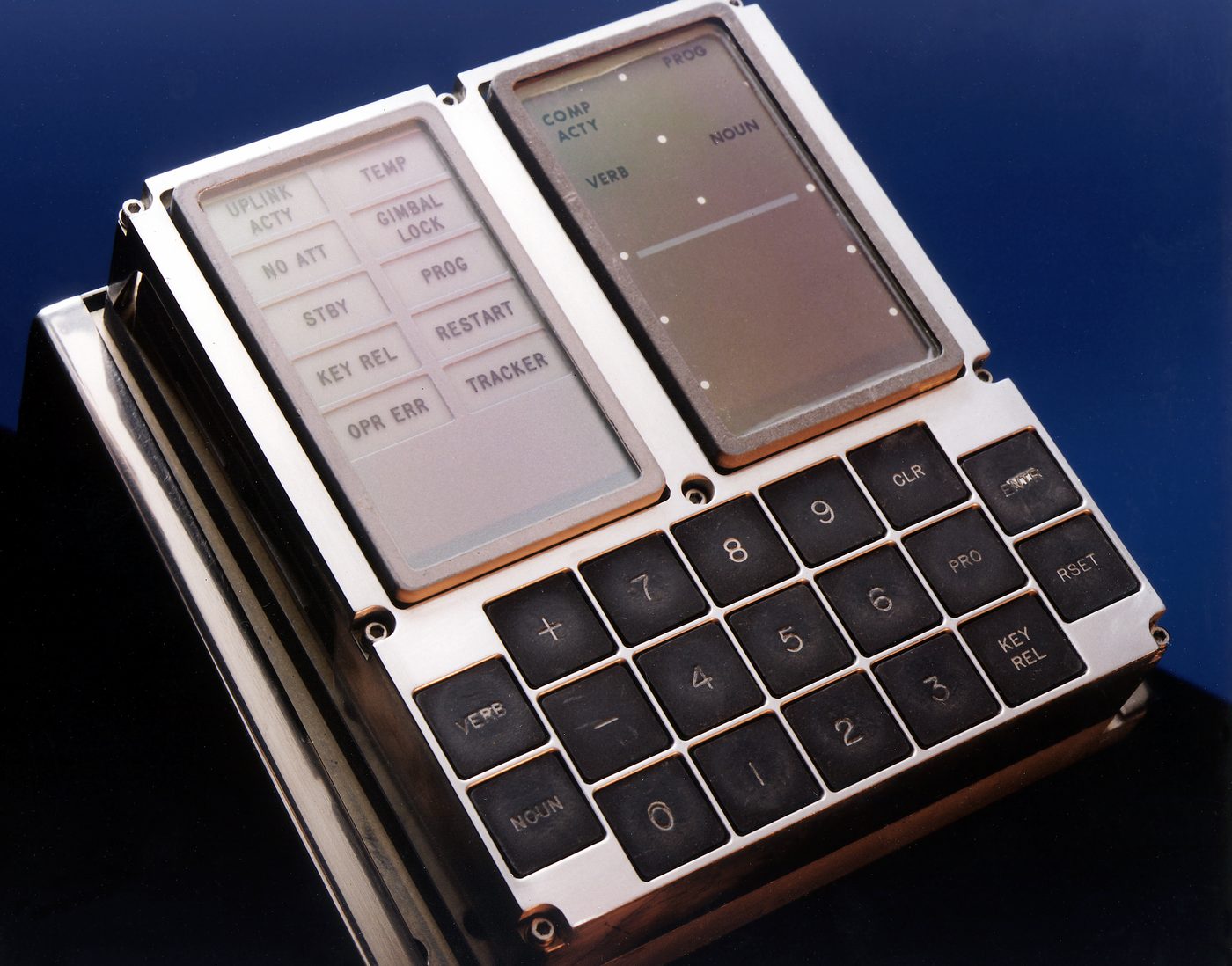
For seven volumes we have circled the Apollo Guidance Computer — its logic gates, its woven memory, its place in the spacecraft — without ever quite looking the crew in the eye. This volume finally turns the machine around so that its face is pointing at us. That face is the DSKY: the Display and Keyboard, pronounced “DISS-key,” the single panel through which three astronauts on the way to the Moon actually touched their computer.
It is worth pausing on how unusual that was. In 1969 almost no one in the world had ever operated a digital computer directly. Computers lived in air-conditioned rooms, fed by punch cards and tended by specialists. The DSKY took that machine, shrank its controls to the size of a paperback’s footprint, ruggedized it for vacuum and vibration, and bolted it to an instrument panel where a person in a pressure suit could run it with gloved fingers while falling toward the lunar surface. The whole series is named after this object because it is the part of the AGC that the public remembers — the calm green digits, the numbered Verbs and Nouns, the little light that flickered to show the computer was thinking.
This volume is about the hardware of that panel: its physical layout, the electroluminescent display, the keyboard, the bank of status lamps, how many DSKYs each spacecraft carried, and how the panel connected back to the computer in its bay. We deliberately hold back the language — the Verb/Noun command grammar — for Volume 9. Here we are interested in the object you could reach out and put your finger on.
8.2 Three Zones on One Panel
The DSKY’s genius is that it says everything it needs to say with a layout you can read in a glance. Stand in front of one and your eye sorts it into three horizontal bands.
At the top sits the status region — two columns of small rectangular indicator lamps on the left, and beside them the numeric display that runs down the right. These warn, alert, and inform: program alarms, gimbal-lock cautions, the heartbeat of computer activity.
In the middle is the display proper: glowing green numerals arranged in a fixed grid. A two-digit PROGRAM number at upper right tells you what major program the computer is running. Below it, side by side, are the two-digit VERB and two-digit NOUN fields — the command currently in play. And below those, three data registers — R1, R2, R3 — each five digits wide with a leading sign, where the computer poured out the numbers the crew needed: velocities, angles, times, altitudes.
At the bottom is the keyboard — a tidy block of pushbuttons, numerals and function keys, that the astronaut pressed to talk back.
The elegance of this top-to-bottom grammar is that it maps to how a conversation works. Lamps and PROG tell you the machine’s state. The VERB/NOUN/register block is what it is saying. The keyboard is how you answer. A trained crewman could take in the whole exchange without moving his eyes more than a few degrees — useful when the other hand is on a thrust controller.
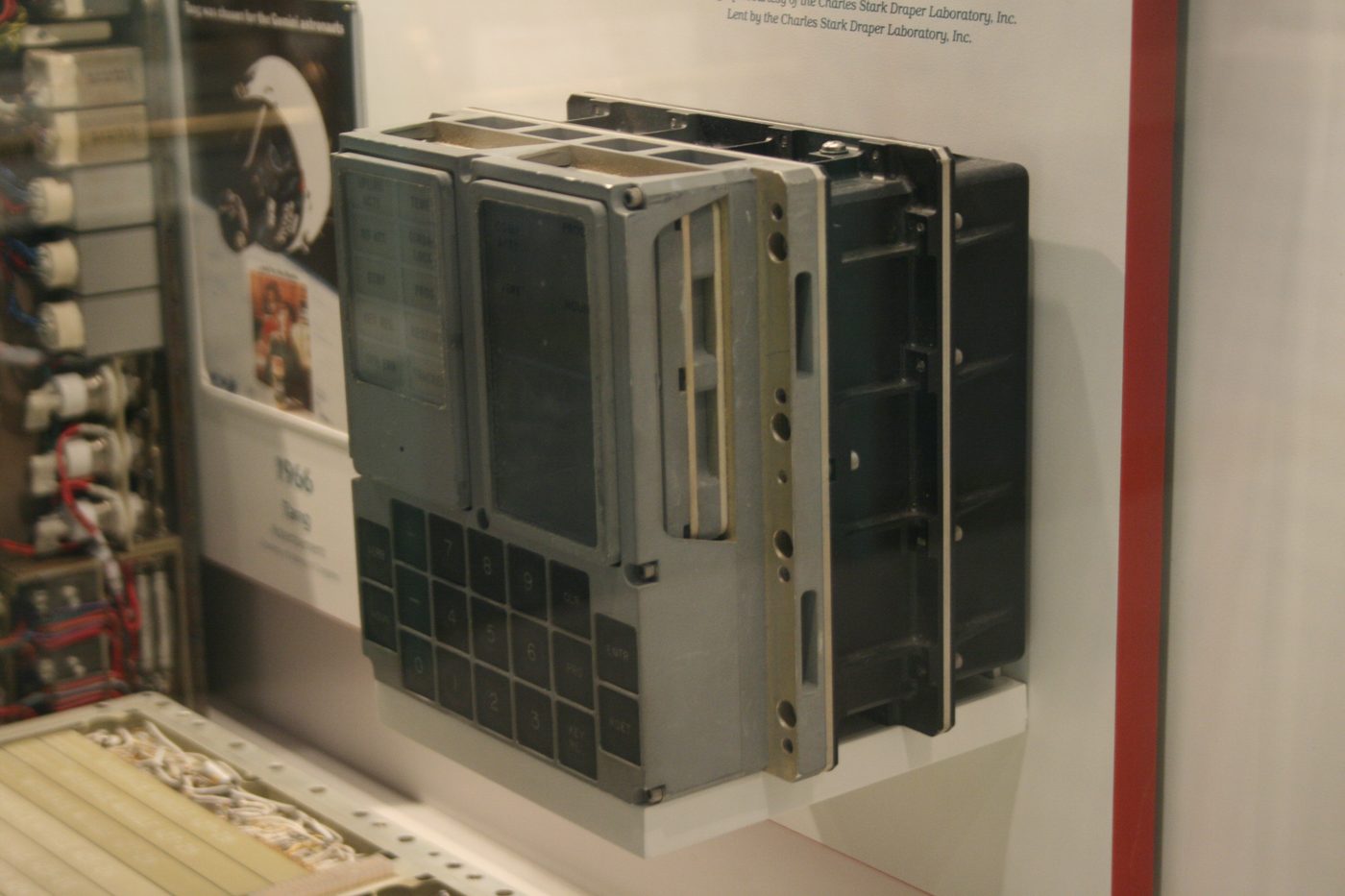
The complete unit was about eight inches square on its face and a little under seven inches deep, weighing roughly 17.5 pounds. It was, in the language of the program, the DSKY — and it was built, like the rest of the AGC, to a specification overseen by the MIT Instrumentation Laboratory and manufactured by Raytheon.
8.3 The Display: Electroluminescent Green, Not LEDs, Not Nixies
The most common misconception about the DSKY is the nature of its glow. It is not a row of nixie tubes, the warm-orange neon digits of 1960s lab gear. It is not an array of light-emitting diodes — LEDs bright enough for a display did not exist when the Block II AGC was frozen. The DSKY’s numerals were drawn in electroluminescent (EL) segments, and they glowed a cool, specific green near 530 nanometers.
Electroluminescence is one of the quieter pieces of physics in the whole spacecraft. Sandwich a phosphor between two electrodes, apply a high-voltage alternating field, and the phosphor emits light directly — no filament, no gas discharge, no heat to speak of. On the DSKY each numeral was a classic seven-segment figure: seven phosphor-coated traces, plus separate elements for the plus and minus signs and for the small lighted word-blocks like PROG, VERB, and NOUN. Energize the right combination of segments and a digit appears out of the dark.
What makes the Apollo display delightfully archaic is how those segments were switched. The AGC did not drive the EL panel directly. Instead, the computer’s output went to a bank of electromechanical latching relays inside the DSKY, and the relay contacts gated the high-voltage AC onto the individual segments. The display was, in the most literal sense, relay-driven. Each digit’s pattern was held by relays that physically latched into place and stayed there until commanded to change — which is exactly why the display could sit rock-steady showing a number while the processor went off and did other work.
This relay heritage explains the display’s two famous dynamic behaviors. First, the update cadence: because numbers were clocked out through relays a few characters at a time, the display refreshed at a stately pace rather than instantaneously — fast enough for a human, far slower than the computer’s own clock. Second, the flashing. When the computer wanted the crew to do something — to acknowledge a request, to enter expected data — it would make the VERB and NOUN fields flash on and off, roughly once a second. A steady Verb/Noun meant “here is information”; a flashing Verb/Noun meant “your move.” That blink was a piece of user-interface design decades ahead of its surroundings: a status conveyed not by a word but by motion, instantly legible across a cabin.
The grid itself was fixed and generous: PROG (2 digits), VERB (2 digits), NOUN (2 digits), and three registers R1, R2, R3 of five digits each, each register carrying its own sign position — twenty-one decimal digits and three signs in all. Five digits per register sounds modest, but with clever scaling the crew read everything from spacecraft weight to a star’s coordinates to the minutes-and-seconds of an engine burn off those same fifteen numeric cells. The registers could also display octal values when needed, a nod to the fact that the people running this machine were as comfortable in base eight as in base ten.
8.4 The Keyboard: Nineteen Keys for a Gloved Hand
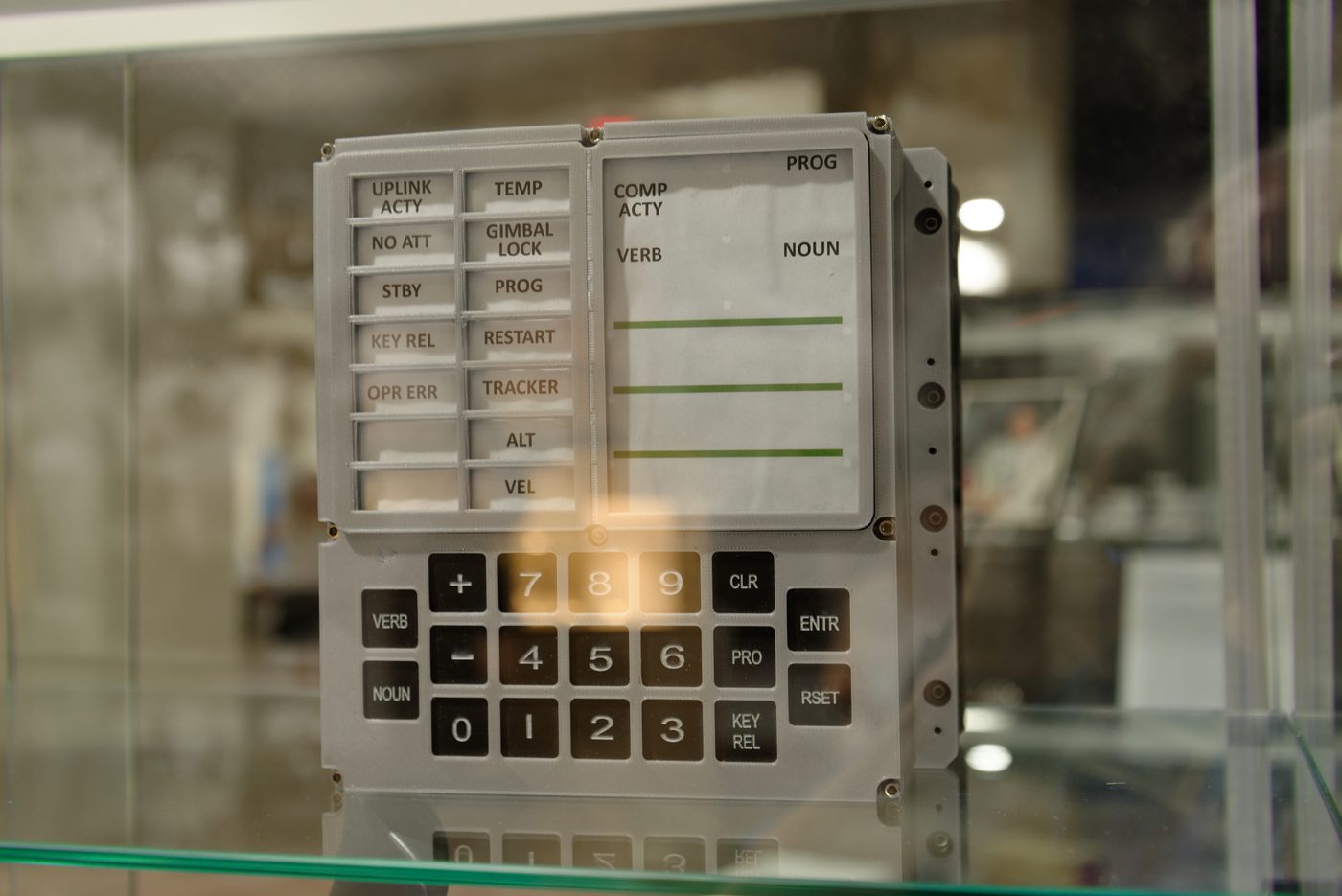
Below the display sat the keyboard — nineteen square pushbuttons that were the crew’s only direct means of commanding the computer. The set was spare and deliberate. There were the ten digit keys, 0 through 9, a plus (+) and a minus (−) for signing data, and then a row of function keys that gave the interface its character:
- VERB — begins entry of a two-digit action code.
- NOUN — begins entry of a two-digit object code (the thing the verb acts on).
- ENTR (Enter) — commits whatever has been keyed; the computer acts only when ENTR is pressed.
- CLR (Clear) — wipes the data field being entered, so a mistyped digit can be corrected before it is committed.
- PRO (Proceed) — tells the computer to go ahead with a default or to proceed past a request; pressed and held, it also commanded the computer’s low-power standby mode.
- KEY REL (Key Release) — hands the display back to the computer after the astronaut had been keying, so an internal program could resume control of the panel.
- RSET (Reset) — clears certain caution-and-warning conditions and resets error indications.
(We save the meanings of the verb and noun codes themselves for Volume 9; here the point is simply that these were the physical keys under the astronaut’s fingers.)
Two design pressures shaped these buttons, and both pointed the same way: toward bigger, firmer, unambiguous keys. The first was the pressure suit. An astronaut might be operating the DSKY with the cabin depressurized, fingers inside the stiff, inflated gloves of a pressure garment, with the tactile sensitivity of someone wearing oven mitts. The keys therefore had a deliberate size, spacing, and mechanical “break” — a positive click you could feel through the glove so you knew a press had registered. The second pressure was the cost of error. A wrong keystroke during a powered descent was not a typo to laugh off, so the function keys were physically and visually segregated from the number block, and the whole entry grammar was built around explicit confirmation: nothing happened until ENTR, and a slip could be undone with CLR before it ever reached the computer.
The result was an input device that feels, even today, reassuringly mechanical. There is no soft touchscreen here, no chord of modifier keys — just a small grid of substantial buttons that an exhausted, gloved, adrenaline-loaded human could hit correctly in the dark.

8.5 The Status Lamps: A Bank of Small Alarms
To the left of the numeric display sat the DSKY’s other communication channel: a matrix of small rectangular indicator lamps, each a back-lit legend that glowed when its condition went true. Where the green digits were the computer’s words, these lamps were its moods — quick caution-and-warning signals that needed no reading of registers to understand.
The most beloved of them was not even in the matrix. COMP ACTY — computer activity — sat at the upper-left of the display region, and it flickered on whenever the AGC was actively running a job. To a crew it was a heartbeat: a steady flutter meant the computer was busy and well; a COMP ACTY light that went dark when you expected work was a reason to worry. More than any other element, that little flickering lamp is what people picture when they remember the DSKY “thinking.”
The rest of the lamps formed two columns of legends. The set common to both spacecraft included:
- UPLINK ACTY — data was arriving from the ground via the uplink, ground controllers reaching into the computer.
- NO ATT — “no attitude”: the inertial platform could not currently supply an attitude reference.
- STBY — the computer was in its low-power standby mode.
- KEY REL — the computer wanted the display back; the crew should press KEY REL to relinquish it.
- OPR ERR — operator error: the keystroke sequence just entered did not make sense.
- TEMP — the inertial platform’s temperature had drifted out of tolerance.
- GIMBAL LOCK — the inertial measurement unit’s middle gimbal had swung past roughly 70 degrees, approaching the angle where the platform would tumble and lose its reference.
- PROG — a program-related alert; the computer was flagging a condition (such as a program alarm) for crew attention.
- RESTART — the computer had performed a restart, reinitializing its software after a detected fault.
- TRACKER — a fault in the optical tracking/coupling units used for navigation.
This same bank of lamps is where the Command Module and Lunar Module DSKYs quietly differed. The CM and LM panels were nearly identical, but the LM — the vehicle that actually had to find a patch of lunar dust and set down on it — carried three extra lamps the Command Module did not: ALT and VEL, which warned that the landing radar’s altitude or velocity data was suspect or out of limits during descent, and NO DAP, flagging a problem with the LM’s digital autopilot. Those legends only made sense on a machine that flew a powered landing, so the Command Module’s panel simply left them out and the LM’s added them in. It is a small detail, but a telling one: the hardware of the panel was tailored to the job each spacecraft actually did.
The most historically charged of all these lamps was PROG. During Apollo 11’s final approach, the DSKY repeatedly threw program alarms — the now-legendary 1201 and 1202 codes — as the overloaded computer shed low-priority work to keep flying the landing. The crew saw the alert, called it down, and Houston made the famous “we’re go on that alarm” calls. That entire drama played out through this one lamp and the registers beside it. We will tell the 1202 story properly in a later volume; for now, note that the panel was built precisely so that a fault could announce itself unmistakably, and a trained crew could decide in seconds whether to press on.
8.6 How Many DSKYs — and Where
A subtle but important fact: a single Moon-landing mission flew with three DSKYs, not one.
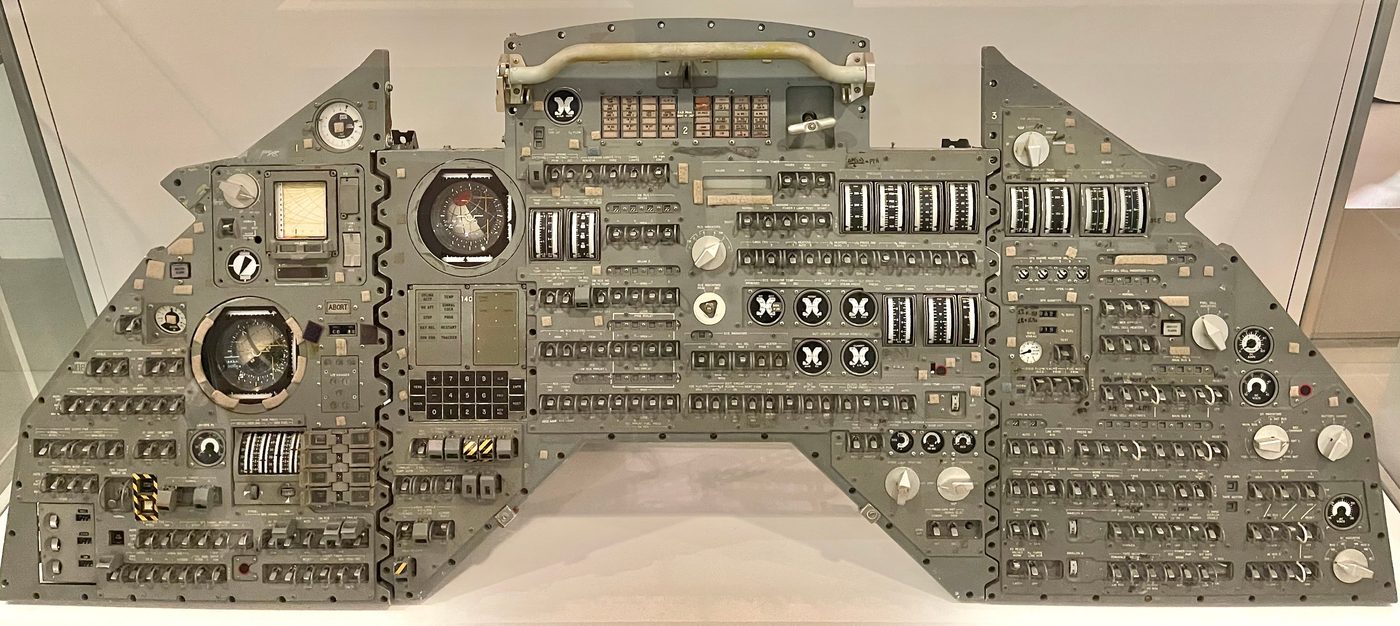
The Command Module carried two. One was set into the main display console in front of the crew couches, where the commander and crew could reach it during launch, translunar flight, and reentry. The second lived down in the lower equipment bay — the navigation station, where an astronaut floated to the optics to align the inertial platform by sighting on stars through the sextant and telescope. That second DSKY put the computer right at the navigator’s hand, so the alignment data went into the machine exactly where the star sightings were taken. Two DSKYs, but one AGC behind them: the units were wired to the same computer, simply offering two physical places to operate it.
The Lunar Module carried one. It sat on the main panel between the commander’s and the LM pilot’s stations, within reach of both as they stood at the controls during descent and ascent. The LM had only the one AGC and the one DSKY — but, as we saw, that DSKY wore the three extra landing lamps.
So the canonical count is: CM = 2 DSKYs, LM = 1 DSKY, three per mission, each a window onto its vehicle’s guidance computer.
8.7 The Connection Back to the Computer
It is easy, looking at a DSKY, to imagine that the panel is the computer. It is not. The AGC itself was a separate sealed box — roughly 70 pounds, drawing about 55 watts, clocked at 2.048 MHz — mounted elsewhere in the spacecraft’s equipment bay, away from the crew. The DSKY was a comparatively dumb terminal hung off the end of it.
The link between the two ran through the AGC’s input/output channel interface. On the output side, the computer wrote to specific I/O channels whose bits were decoded inside the DSKY to fire the relays that latched the EL segments and lit the lamps. On the input side, every keypress closed a contact that put a five-bit code onto the computer’s input channels, where the running software read it as the next character of a command. The flashing of the Verb and Noun fields, the flicker of COMP ACTY, the steady octal in a register — all of it was the computer reaching out through that channel interface to a panel that held no real intelligence of its own. The DSKY displayed and transmitted; the thinking happened in the box in the bay.
That separation is part of why the interface aged so gracefully. Because the panel was simple — sturdy relays and phosphor and pushbuttons, with all the cleverness kept in the computer behind it — the thing the astronauts actually touched could be made rugged, legible, and forgiving — a human-scaled face on a machine that was, for its day, almost unimaginably complex. The numbers were green, the keys were firm, the heartbeat flickered, and a person in a spacesuit could fly to the Moon by it.
Next — Volume 9: Verbs and Nouns — The Language of Apollo.
Comments (0)